File Struct Exploits P1
File Struct Exploits P1 is an explanation of how to use File Struct overwrites to gain an Arbitrary Read or Write Primitive.
File Struct Exploits P1 is an explanation of how to use File Struct overwrites to gain an Arbitrary Read or Write Primitive. P2 will be an explanation of how to use File Struct Exploits to gain Arbitrary Code Execution.
Introduction
Programmers wanted a more efficient way to read and write data to files because before userland file buffering, every single read and write operation was a context switch from userland to kernelspace, which was really slow. So, developers at glibc implemented a solution to the problem, buffering a file in userland, and only switching to the kernel context after a certain amount of data was read from or written to a buffer. To implement the buffering, methods like fopen(), fread(), and fwrite() were created.
How does this work you might ask?
When fopen() is called, it creates a File Struct in memory that tracks the state of a buffer. Once data is in the user-space buffer, many reads and writes can be handled without another kernel call until libc needs to refill the buffer or flush pending output. This significantly reduces the number of kernel calls there are.
fopen() creates a FILE structure which stores information about the stream, including its buffer state and the operations that can be performed on it. Some important fields for arbitrary reading and writing are _flags, _IO_read_ptr, _IO_read_end, _IO_read_base, _IO_write_base, _IO_write_ptr, _IO_write_end, _IO_buf_base, and _IO_buf_end. The _flags field contains stream state information, including whether the stream is currently being used for reading or writing. _IO_buf_base points to the beginning of the file buffer, and _IO_buf_end points to the end of the file buffer. _IO_read_base points to the beginning of the current read area. _IO_read_end points to the end of the valid readable data in the buffer. This often points near the end of the buffer, but if the last refill did not fill the buffer completely, _IO_read_end marks the correct ending location. _IO_read_ptr points to the current read position. When switching from writing to reading, _IO_read_ptr is set equal to _IO_write_ptr, and pending buffered output is flushed if needed. _IO_write_base points to the beginning of the current write area in the buffer. When switching from reading to writing, _IO_write_base and _IO_write_ptr are set equal to _IO_read_ptr. _IO_write_end points to the end of the writable area in the buffer, and _IO_write_ptr points to the current end of the data that has been written into the buffer.
That was a lot! Luckily, pwn.college gives a really helpful diagram to understand this. I’m going to put them below and link to their amazing File Struct Exploits module if you want to explore more on this topic after this.
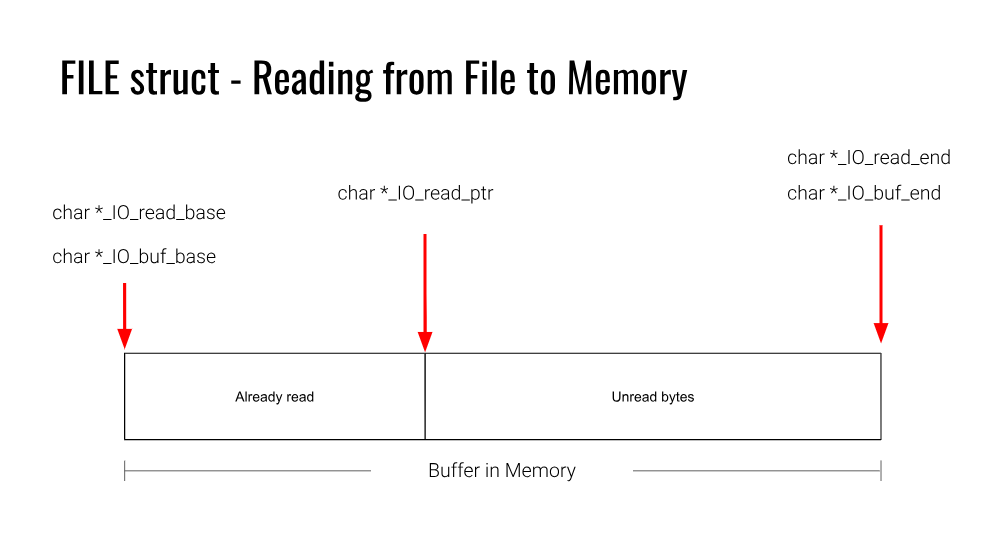
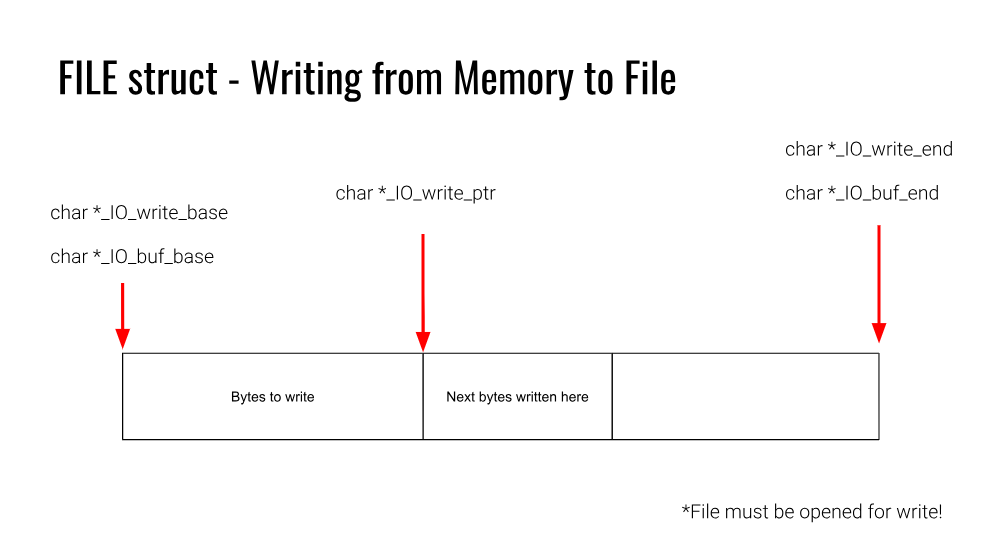
https://pwn.college/software-exploitation/file-struct-exploits/
Exploitation
These fields are used to determine what to read or write when fread() and fwrite() are called, and when the buffer needs to be refilled or flushed. For example, when there is an fread() operation, _IO_read_ptr keeps track of where reading stopped, so if fread() is called again, it will resume from that location. If _IO_read_ptr == _IO_read_end during a read, that means there is no valid readable data left in the buffer, so glibc will refill it. Flushing can happen under other conditions too, including when main() returns, exit() is called, or fclose() is called to push any remaining buffered output out with the appropriate syscall.
So, now to the juicy stuff. How can this be exploited to our advantage?
If we can overwrite some of these File Struct fields, we can manipulate how flushing works to gain reads and writes to arbitrary locations.
Arbitrary Write:
When fread() is called on a FILE structure with maliciously modified fields, it can be used to trigger an Arbitrary Write. The fields that are important to overwrite for this are _flags, _IO_read_ptr, _IO_read_end, _IO_buf_base, _IO_buf_end, and _fileno. To start with, _flags is often set to 0x0 to keep the stream in a simple, non-error state and avoid unwanted behavior. Next, _IO_read_ptr should be set equal to _IO_read_end, because this makes glibc think there is no valid data left to read in the buffer, which forces it to refill the buffer. After that, _IO_buf_base should be set to the address we want to write to, and _IO_buf_end should be set to the address we want to write to plus the length of the data we want to write. This works because when the refill happens, glibc will use a syscall to read data from the file descriptor in kernel space and place that data at _IO_buf_base in user space. As long as the amount of data read fits within _IO_buf_end - _IO_buf_base, the write will succeed. However, at this point we only have a redirected write from the original file descriptor to an arbitrary location. To turn this into a full arbitrary write, we also need to control the data being written. To do that, we overwrite _fileno, which stores the file descriptor used during the refill. If _fileno is changed to stdin (0), then the data will come from standard input, and if it fits within the fake buffer range, it will be written to that location, giving us a full arbitrary write primitive.
Arbitrary Read:
When fwrite() is called on a FILE structure that has maliciously modified fields, it can be used to trigger an Arbitrary Read. The fields that are important to overwrite for this are _flags, _IO_write_base, _IO_write_ptr, _IO_read_end, and _fileno. To start with, the stream needs to be in write mode, so _flags should have the _IO_CURRENTLY_PUTTING bit set (0x800). Next, _IO_write_base should be set to the address we want to read from, and _IO_write_ptr should be set to that address plus the number of bytes we want to read. This makes glibc think there is pending buffered output in the range from _IO_write_base to _IO_write_ptr. After that, _IO_read_end needs to be set equal to _IO_write_base. This is a little unintuitive at first, but if those two values are not equal, glibc may try to adjust the underlying file descriptor position before writing. That check exists because when a stream switches from reading to writing, the kernel file offset may be ahead of the logical position in the buffer, so glibc tries to realign it. In normal use this is helpful, but for exploitation it usually messes with the primitive. Once these fields are set up, anything that causes the stream to flush will make glibc write the bytes between _IO_write_base and _IO_write_ptr to the file descriptor stored in _fileno. If that descriptor is stdout (1), the bytes at the target address get printed back to us, giving a full arbitrary read primitive.
pwntools
pwntools provides some functions to do all of this very easily! The File Structure object has all the fields as a regular File Struct in memory. If an overwrite of the File Struct is possible, the modified pwntools File Structure object can be directly used to overwrite the one in memory and trigger an Arbitrary Read or Write.
Arbitrary Write:
1
2
3
from pwn import *
fs = FileStructure()
payload = fs.read(<address>, <write_length>)
Arbitrary Read:
1
2
3
from pwn import *
fs = FileStructure()
payload = fs.write(<address>, <read_length>)
The write() and read() methods on the File Struct object automatically fill in all the relevant fields. For example, an Arbitrary Write payload is shown below:
1
2
3
4
5
6
7
8
9
10
11
12
13
14
15
16
17
18
19
20
21
22
23
24
25
26
27
28
29
30
31
32
>>> from pwn import *
>>> fs = FileStructure()
>>> fs.read(0x404040, 0x30)
b'\x00\x00\x00\x00\x00\x00\x00\x00\x00\x00\x00\x00\x00\x00\x00\x00\x00\x00\x00\x00\x00\x00\x00\x00\x00\x00\x00\x00@@@\x00p@@\x00\x00\x00\x00\x00\x00\x00\x00\x00\x00\x00\x00\x00\x00\x00\x00\x00\x00\x00\x00\x00\x00\x00\x00'
>>> print(fs)
{ flags: 0x0
 _IO_read_ptr: 0x0
 _IO_read_end: 0x0
 _IO_read_base: 0x0
 _IO_write_base: 0x0
 _IO_write_ptr: 0x0
 _IO_write_end: 0x0
 _IO_buf_base: 0x404040
 _IO_buf_end: 0x404070
 _IO_save_base: 0x0
 _IO_backup_base: 0x0
 _IO_save_end: 0x0
 markers: 0x0
 chain: 0x0
 fileno: 0x0
 _flags2: 0x0
 _old_offset: 0xffffffff
 _cur_column: 0x0
 _vtable_offset: 0x0
 _shortbuf: 0x0
 unknown1: 0x0
 _lock: 0x0
 _offset: 0xffffffffffffffff
 _codecvt: 0x0
 _wide_data: 0x0
 unknown2: 0x0
 vtable: 0x0}
Conclusion
For practice with Arbitrary Reading and Writing, try pwn.college’s File Struct Exploits module: Levels 1-6.
https://pwn.college/software-exploitation/file-struct-exploits/